Cipi control panel and API: what the two optional extensions unlock
By Andrea Pollastri · Last updated: · free to read, no paywall
Cipi is, and stays, CLI-first. Everything a server needs — apps, databases, SSL, deploys, backups — is one cipi command over SSH. Since v4.7.0 you can add two optional packages: cipi/api and cipi/gui. This guide is about what they unlock together, and why neither is required.
- Two extensions, zero lock-in
- The API is the backbone
- What you can do with the API
- Sanctum tokens and granular abilities
- Async jobs and polling
- MCP: Cipi inside Cursor, VS Code and Claude
- The UI panel as a multi-server cockpit
- What you can do in the browser
- Server cockpit
- How to install them
- SSL, 2FA and IP whitelist
- Use cases: teams, agencies, hosting, AI
- PHP SDK for Laravel and other frameworks
- cipi-cli, the PHP SDK, and WHMCS
- FAQ
Two extensions, zero lock-in
Cipi is not a panel that hides a CLI. It is a CLI that, if you want, exposes an API and a dashboard. Skip both packages and the server runs exactly as before — no extra daemon, no web surface, nothing listening. Install only what you need.
cipi/api— a Laravel package (current release 1.34.0; the repository check and the build at creation need Cipi 5.6.0+, disk usage 5.5.2+, the 1.31 surface still needs 5.4.1+) that exposes REST at/api/*, an MCP server at/mcp(73 tools) and Swagger UI at/docs.cipi/gui— a self-hosted Laravel 12 dashboard that talks to one or more servers only through that REST API. It has no proprietary control plane and stores no managed-server state.
Anything you do in the browser, you can do from the shell. Anything you do from the shell, you can automate over HTTP. Both packages are clients of the same surface, not a second Cipi.
The normative source is still the documentation: Advanced → cipi api and Control panel (GUI). This guide is the story of the capabilities, not every endpoint.
The API is the backbone
Enable the API before you touch the GUI. One command provisions Laravel under /opt/cipi/api, the Nginx vhost, SSL, an SQLite queue and cipi-queue.service:
$ cipi api api.example.com
$ cipi api ssl
$ cipi api token create
The package is server-level automation — distinct from the Cipi Agent (cipi/agent inside each Laravel app). The Agent covers per-app webhooks, health and MCP. The API covers the whole box: apps, databases, PHP, SSH, services, SMTP, healthchecks, IP whitelist.
PHP-FPM runs as www-data and executes Cipi commands via sudo against an explicit whitelist in /etc/sudoers.d/cipi-api. Vault and MariaDB passwords stay inside Cipi, not in PHP. After cipi self-update, if /docs or /mcp return HTTP 500, cipi api fix-permissions repairs storage and SQLite ownership.
What you can do with the API
The OpenAPI surface covers a Cipi server's lifecycle. Reads are synchronous; writes (create, edit, delete, deploy, SSL, aliases, www, databases) return 202 Accepted with a job_id.
| Area | What it unlocks |
|---|---|
| Apps | Laravel, Node (SPA / static / SSR, API 1.31+) and custom CRUD, Octane/FrankenPHP, DB engine at create time, wildcard primary domains, fix-permissions, suspend/unsuspend (HTTP 503), rename primary domain, HTTP Basic Auth, paginated logs, .env, Composer auth.json, Artisan and whitelisted app run, deploy-config, recreate Git webhooks |
| Deploy | Zero-downtime deploy, rollback, unlock a stuck release, and the hash-chained deploy audit ledger (API 1.31+ / Cipi 5.4.0+) |
| Aliases and WWW | Aliases, apex/www counterpart, force-to-root / force-from-root, clear redirects |
| Redirects and proxies | Whole-app redirect in one hop, path redirects, reverse proxy prefixes — synchronous, nginx -t with revert, the loopback guard never bypassed (API 1.31+ / Cipi 5.4.1+) |
| Node | Installed runtimes and the server default, per-app Node status, blue/green restart of SSR apps (API 1.31+ / Cipi 5.4.1+) |
| SSL | Let's Encrypt (SAN on primary + aliases) and force HTTPS without re-issuing the certificate |
| Databases | MariaDB and PostgreSQL: list/engines, create, backup, restore, password, install an engine. Dropping a database and changing the default engine stay on the CLI since API 1.19 |
| Server | GET /api/status (CPU, RAM, disk, services, PHP pools, app count) — the same snapshot as cipi status |
| Cockpit | PHP 8.3/8.4/8.5 install, SSH keys, service restarts, SMTP, HTTP healthchecks, IP whitelist on /api/* and /mcp; Meilisearch status and per-app enable/disable; read-only host packages, system monitor and Cloudflare Zero Trust status (API 1.31+) |
Minimal example — list apps and read server status:
export CIPI_API_URL="https://api.example.com"
export CIPI_API_TOKEN="1|your-sanctum-token"

curl -sS "${CIPI_API_URL}/api/apps" \
  -H "Authorization: Bearer ${CIPI_API_TOKEN}" \
  -H "Accept: application/json"

curl -sS "${CIPI_API_URL}/api/status" \
  -H "Authorization: Bearer ${CIPI_API_TOKEN}"
Create a Laravel Octane app (async, API 1.13+ / Cipi 5.0+):
curl -sS -X POST "${CIPI_API_URL}/api/apps" \
  -H "Authorization: Bearer ${CIPI_API_TOKEN}" \
  -H "Content-Type: application/json" \
  -d '{
    "domain": "shop.example.com",
    "repository": "git@github.com:you/shop.git",
    "branch": "main",
    "octane": true,
    "engine": "mariadb"
  }'
Swagger UI at https://api.example.com/docs is the playground: try every operation with the same token, inspect request/response and job types. The spec lives at public/api-docs/openapi.json.
Sanctum tokens and granular abilities
Auth is Laravel Sanctum. Each token carries one or more abilities: a CI token can hold only deploy-manage and apps-view; a panel token needs the full set. cipi api token create reads the canonical list from the package (same as php artisan cipi:token-abilities).
Abilities cover apps (view/create/edit/delete/suspend/basicauth/env/auth/artisan/run/deploy-config), aliases, www, deploy, SSL, databases, status, MCP and — since API 1.15+ — PHP, SSH, services, SMTP, health and IP whitelist; API 1.31 adds redirects-view/manage, proxies-view/manage, node-view/manage, search-view/manage, packages-view, monitor-view and zt-view. Revoke with cipi api token revoke <id>. Do not reuse a full-ability token in a public pipeline.
Async jobs and polling
A deploy or db create does not live in the HTTP request: the API queues the work and returns 202 + job_id. Poll GET /api/jobs/{id} for status, CLI output and exit_code. That is the same overlay the GUI shows and the same loop as cipi-cli jobs wait.
curl -sS -X POST "${CIPI_API_URL}/api/apps/myapp/deploy" \
  -H "Authorization: Bearer ${CIPI_API_TOKEN}"

curl -sS "${CIPI_API_URL}/api/jobs/JOB_ID" \
  -H "Authorization: Bearer ${CIPI_API_TOKEN}"
Since Cipi 4.6.3 the API package soft-updates every night at 04:30 (cipi api update), so REST endpoints and MCP tools stay current without a manual step.
MCP: Cipi inside Cursor, VS Code and Claude
The MCP server at /mcp (Streamable HTTP) exposes 73 tools: apps, aliases, www, redirects, proxies, Node, databases, deploy and deploy audit, SSL, Basic Auth, search, limits, disk usage, server cockpit, packages, monitor, Zero Trust, .env / auth.json / app-run / deploy-config, jobs, logs and ServerStatus. From API 1.11.1+ a token with only mcp-access is enough for every MCP tool — per-endpoint REST abilities are not checked on /mcp.
Cursor config in ~/.cursor/mcp.json:
{
  "mcpServers": {
    "cipi-api": {
      "type": "http",
      "url": "https://api.example.com/mcp",
      "headers": {
        "Authorization": "Bearer 1|your-token"
      }
    }
  }
}
VS Code (Copilot) uses the same HTTP transport; Claude Code adds the server with claude mcp add --transport http; Claude Desktop goes through mcp-remote. Log tools redact common secrets before they return. The same protocol, on the app side, is what the in-app Agent MCP exposes — two surfaces, one standard.
The UI panel as a multi-server cockpit
The GUI is a thin visual layer on top of the API. It lives in /opt/cipi/gui, it is Laravel (12 or 13) with Livewire, and it keeps no local queue workers: it authenticates to each server's API, dispatches jobs and polls their status. Tear the panel down and rebuild it elsewhere without touching a managed server.
One login, many servers. Register endpoint + token for production, staging and client boxes, then switch between them from the header on any page. It is the cockpit you want when you have more than one VPS and you do not want ten SSH sessions open.
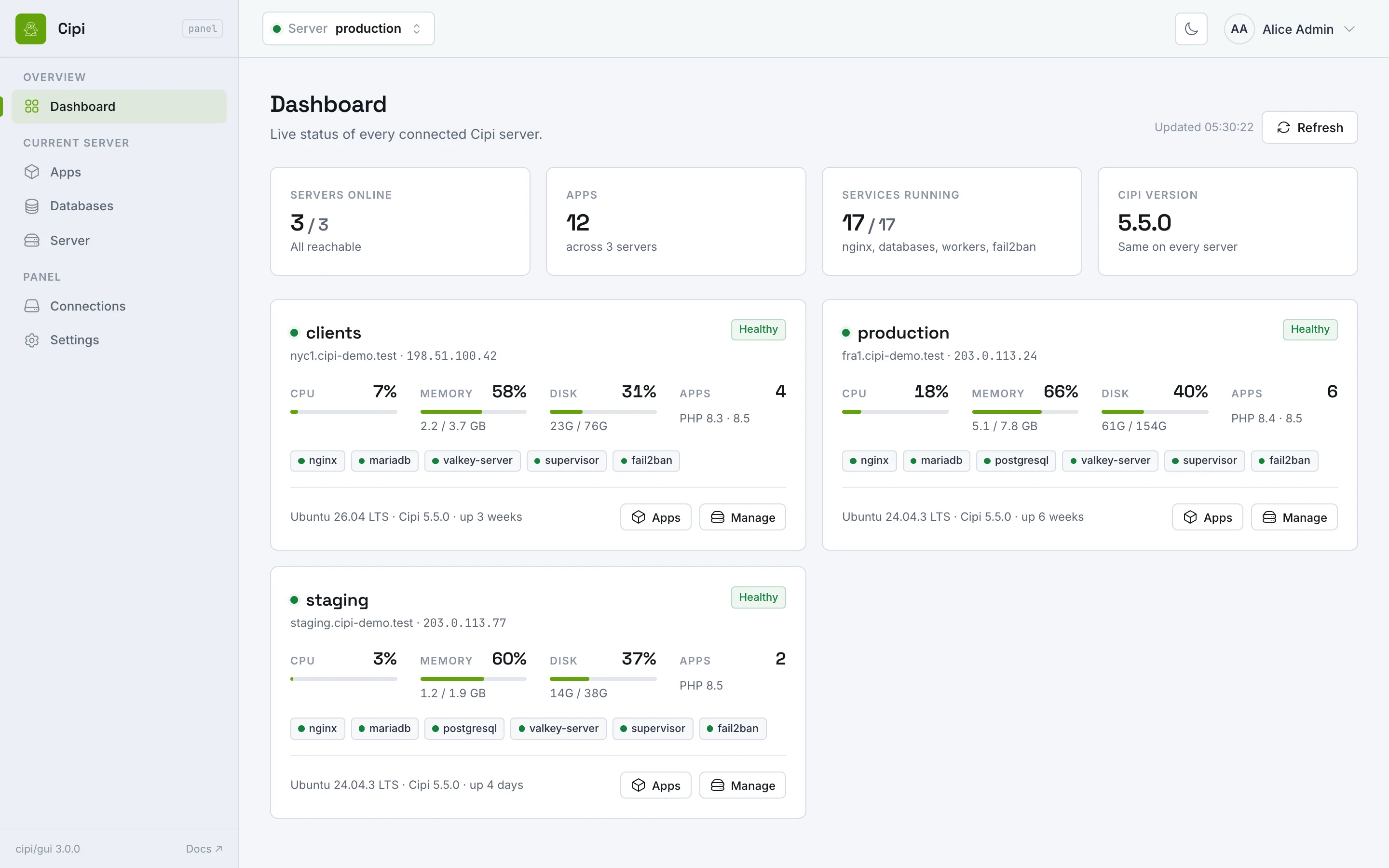
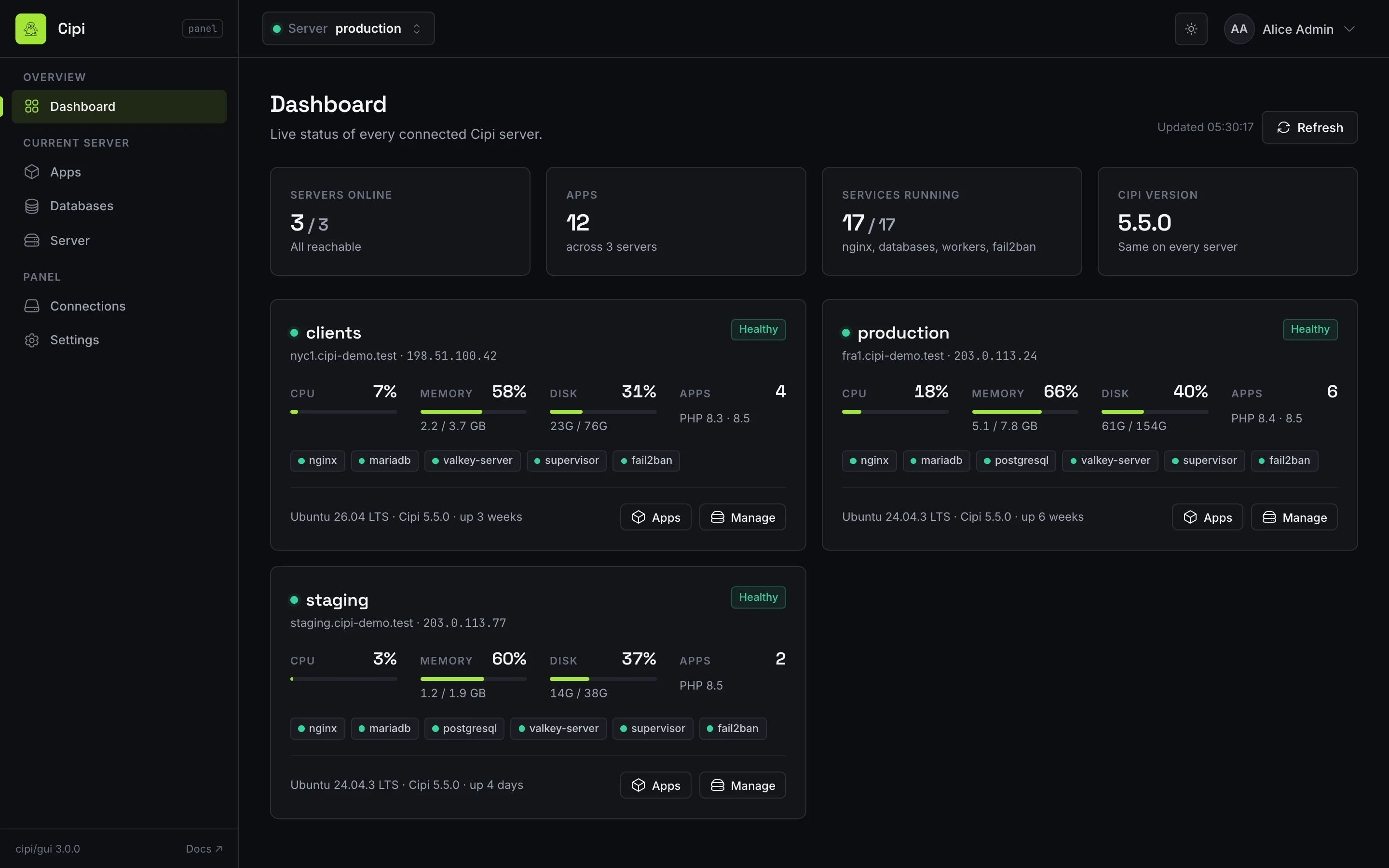
The panel needs the API on every server you want to manage, with a full-ability Bearer token (include www-manage, status-view and, for app tooling, apps-env, apps-auth, apps-artisan, apps-run, apps-deploy-config). Without the API, the GUI is an empty shell.
What you can do in the browser
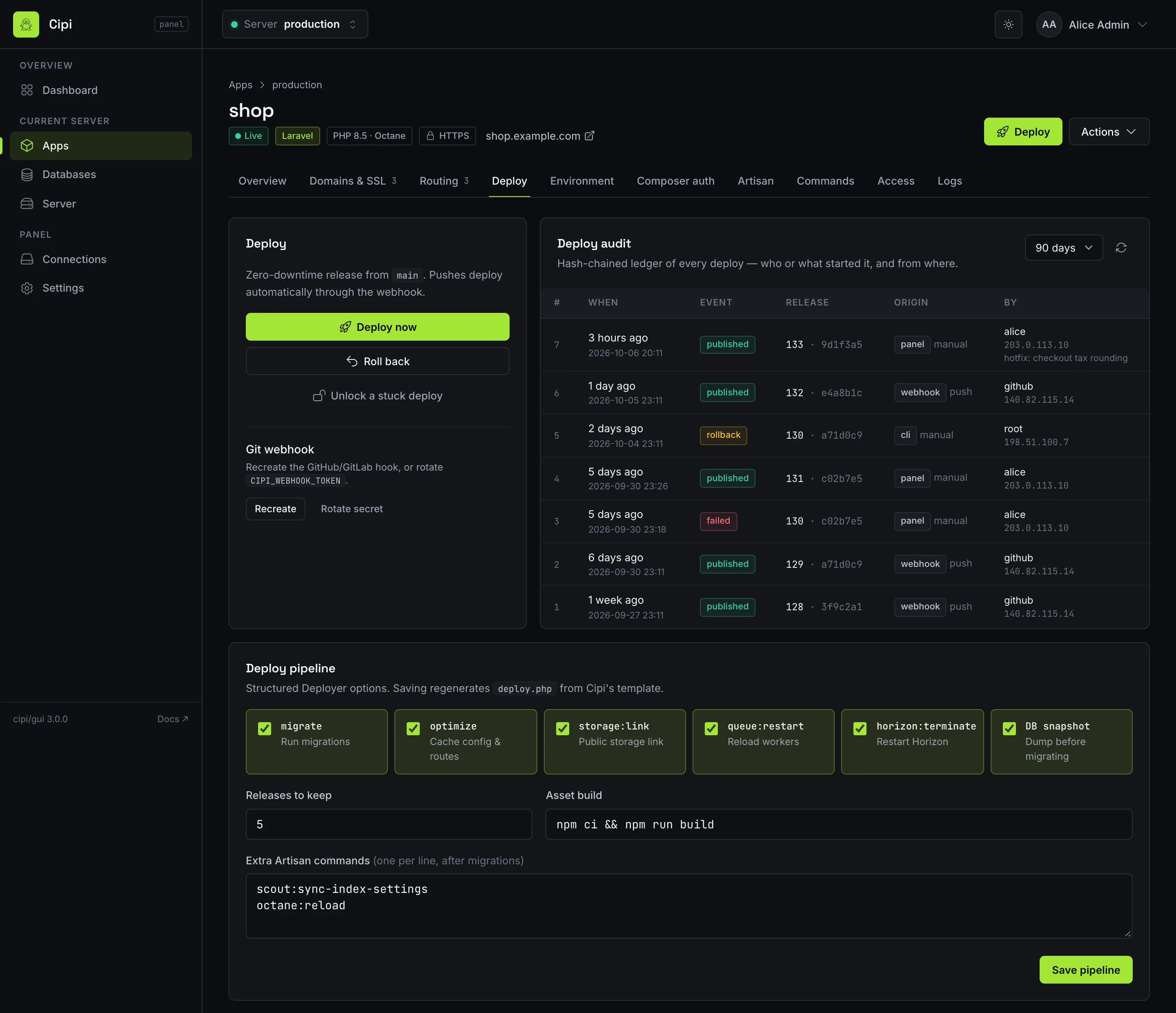
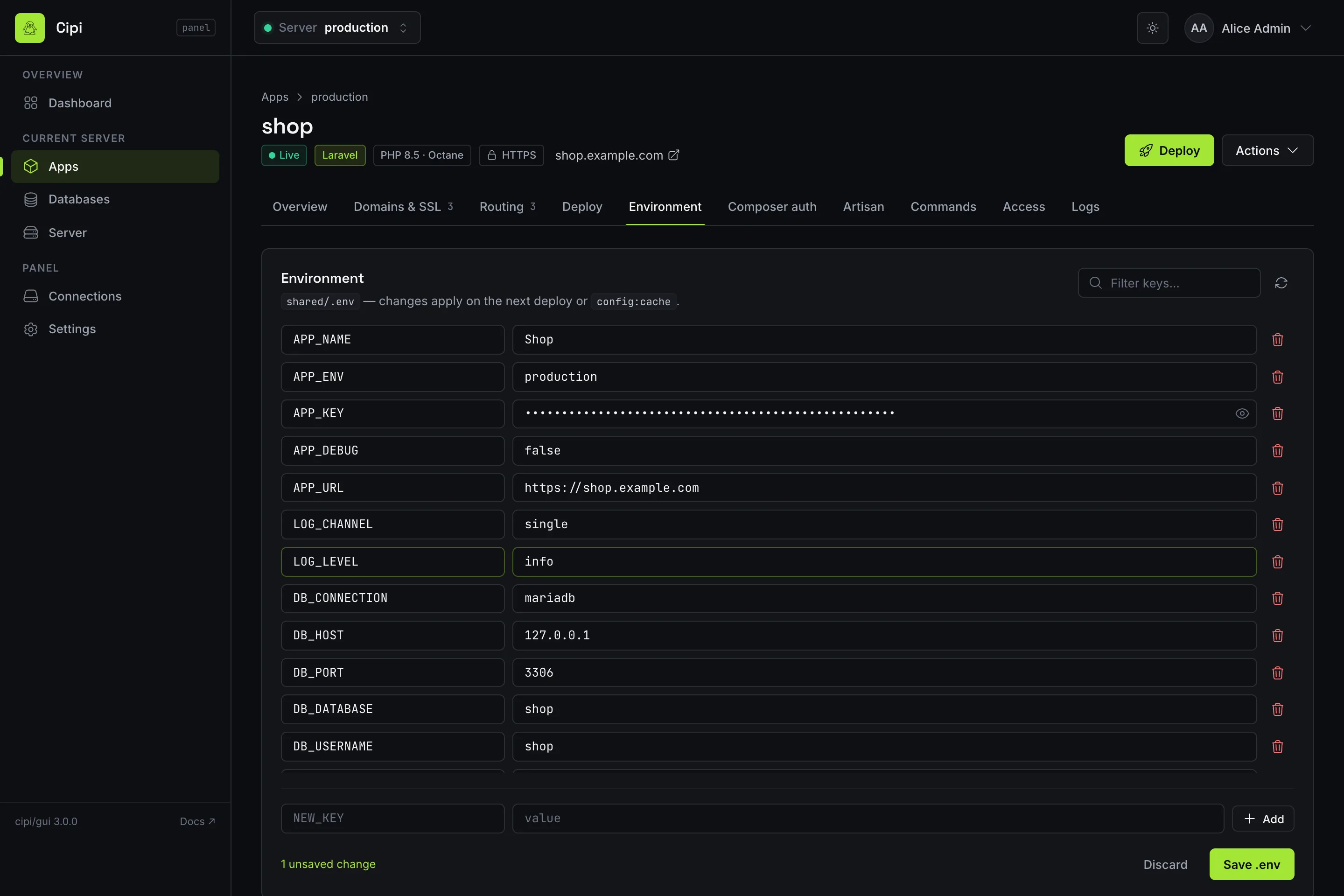
- Laravel, Node and custom apps — create, edit, deploy, rollback, unlock, suspend/unsuspend, fix permissions, delete. Octane (FrankenPHP) at create time from API 1.13+; list/detail views distinguish FPM from Octane. Node apps from API 1.31+: framework preset, Node major, build/start, output, health path, blue/green restart — and a Laravel app's asset build can be pinned to its own Node major.
- Redirects and proxies — whole-app redirect (set, enable, disable, unset), path redirects and prefix reverse proxies, with the CLI's own refusals (API 1.31+ / Cipi 5.4.1+).
- Deploy config and audit — structured
deploy.phpoptions, and who or what deployed each release, from where (API 1.31+ / Cipi 5.4.0+). - Aliases, WWW, SSL, Basic Auth — the same flow as the CLI, plus force HTTPS and apex/www redirects.
.env,auth.json, Artisan, App commands — editor and terminal output with Markdown copy (API 1.14+ / Cipi 5.0.3+).- Multi-engine databases — pick MariaDB or PostgreSQL at create time; backup, restore and password rotation from the browser (API 1.12+ / Cipi 4.8+).
- Logs — nginx, PHP-FPM, Laravel, worker, deploy: type filter, pagination, auto-refresh. Common secrets are redacted.
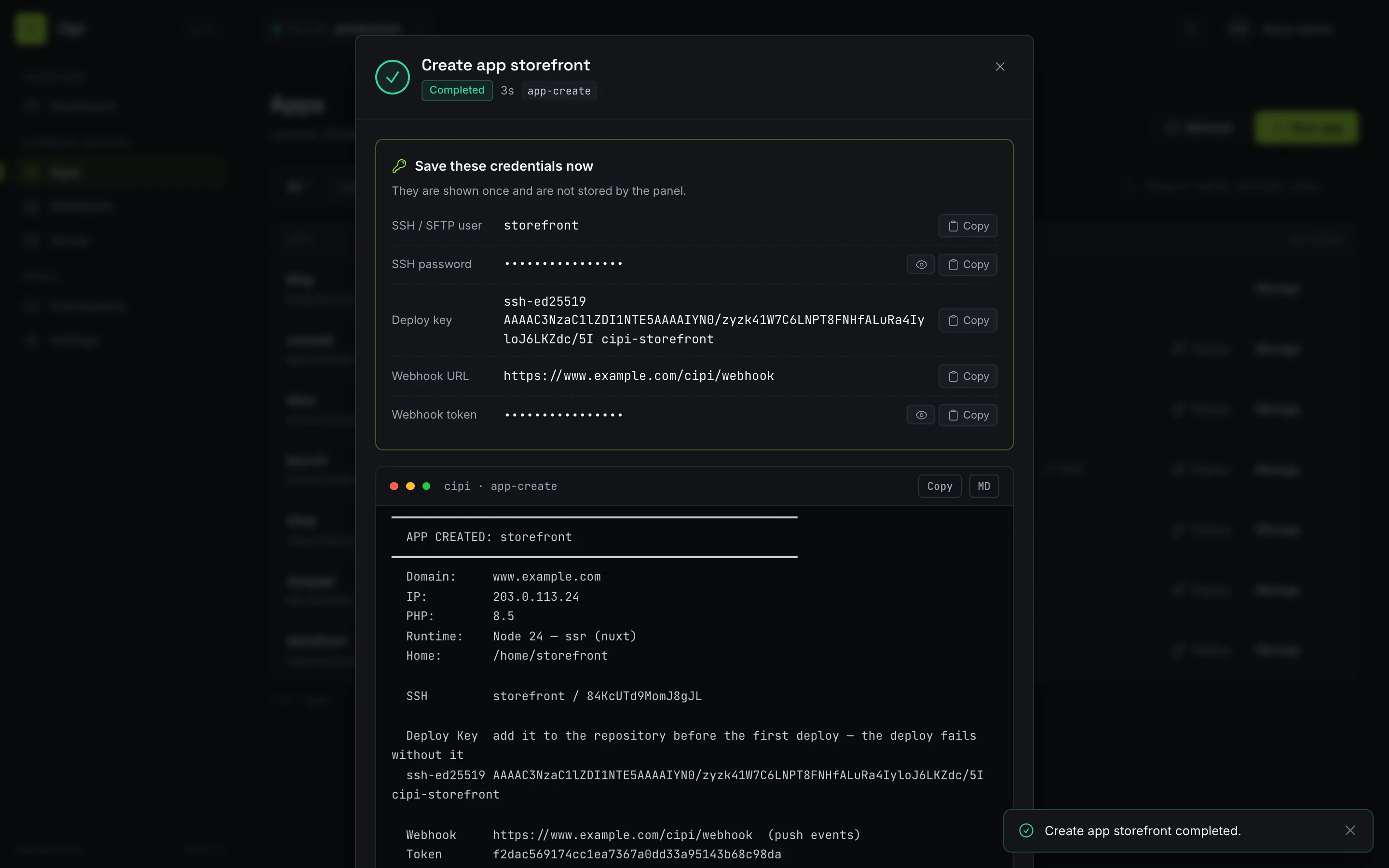
- Job overlay — live status, elapsed time and CLI output while the panel polls
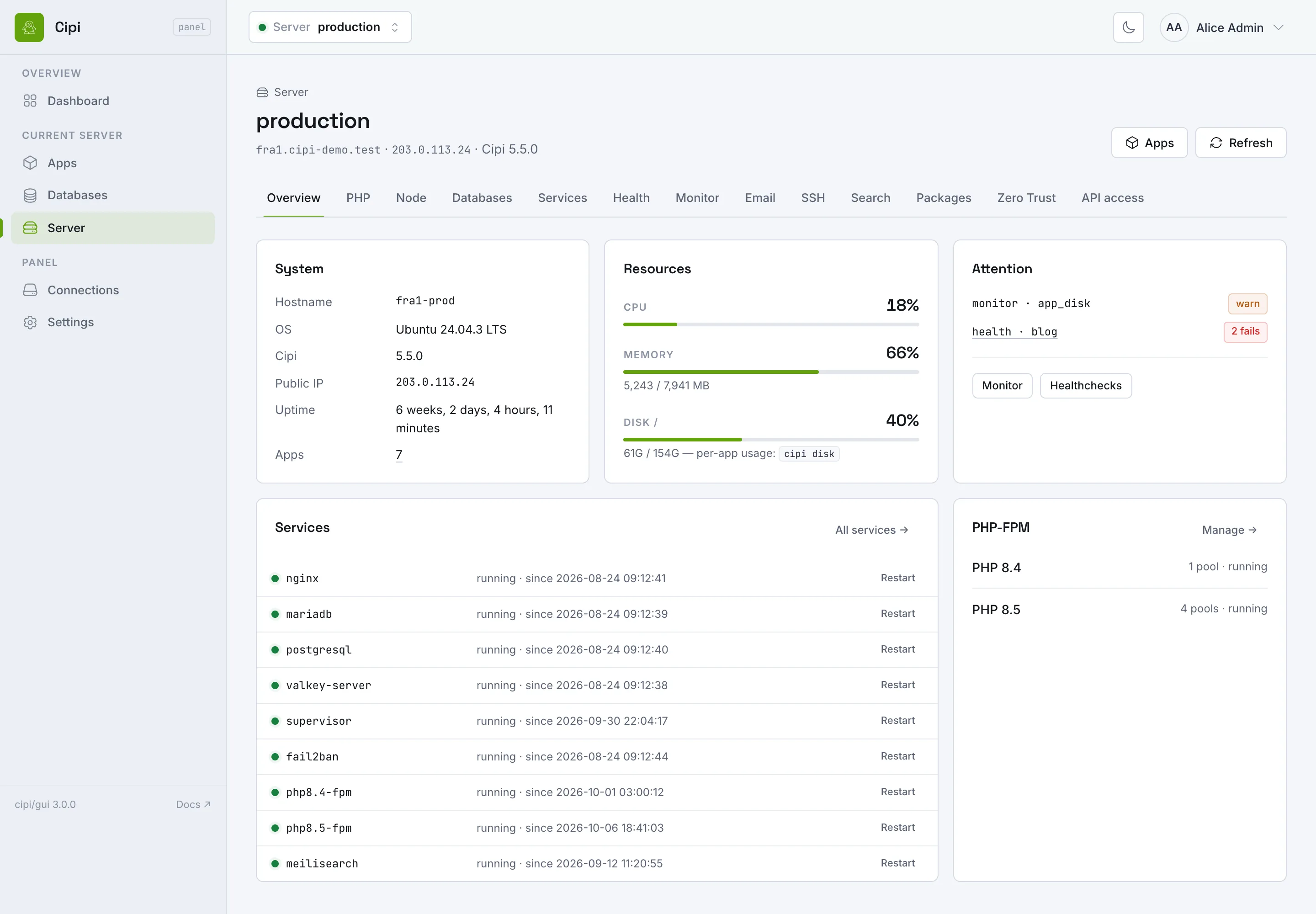
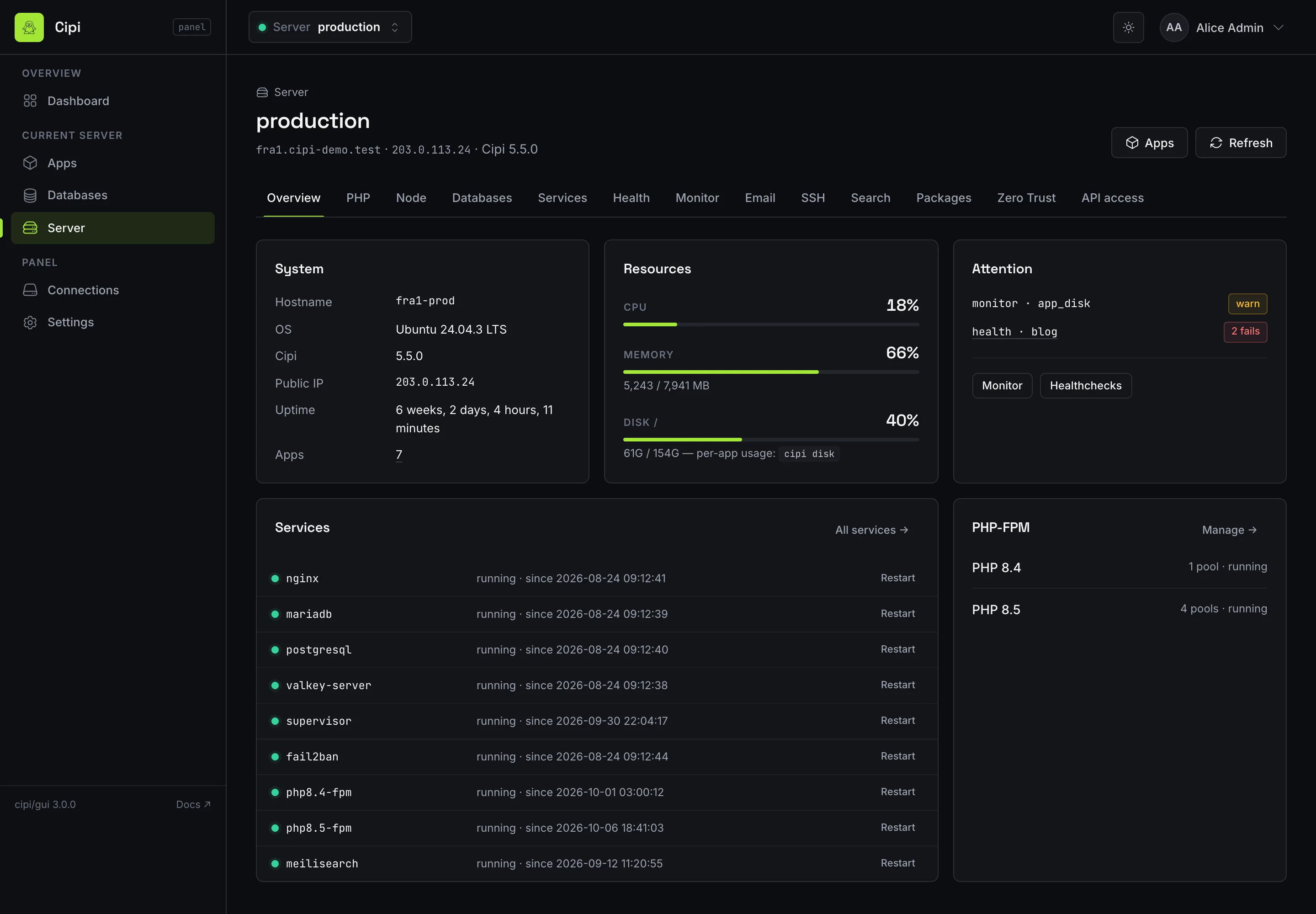
GET /api/jobs/{id}; one-time credentials (SSH and database passwords, deploy key, webhook token) come back with copy buttons. - Live dashboard — CPU, memory, disk, services and app count via
GET /api/status.
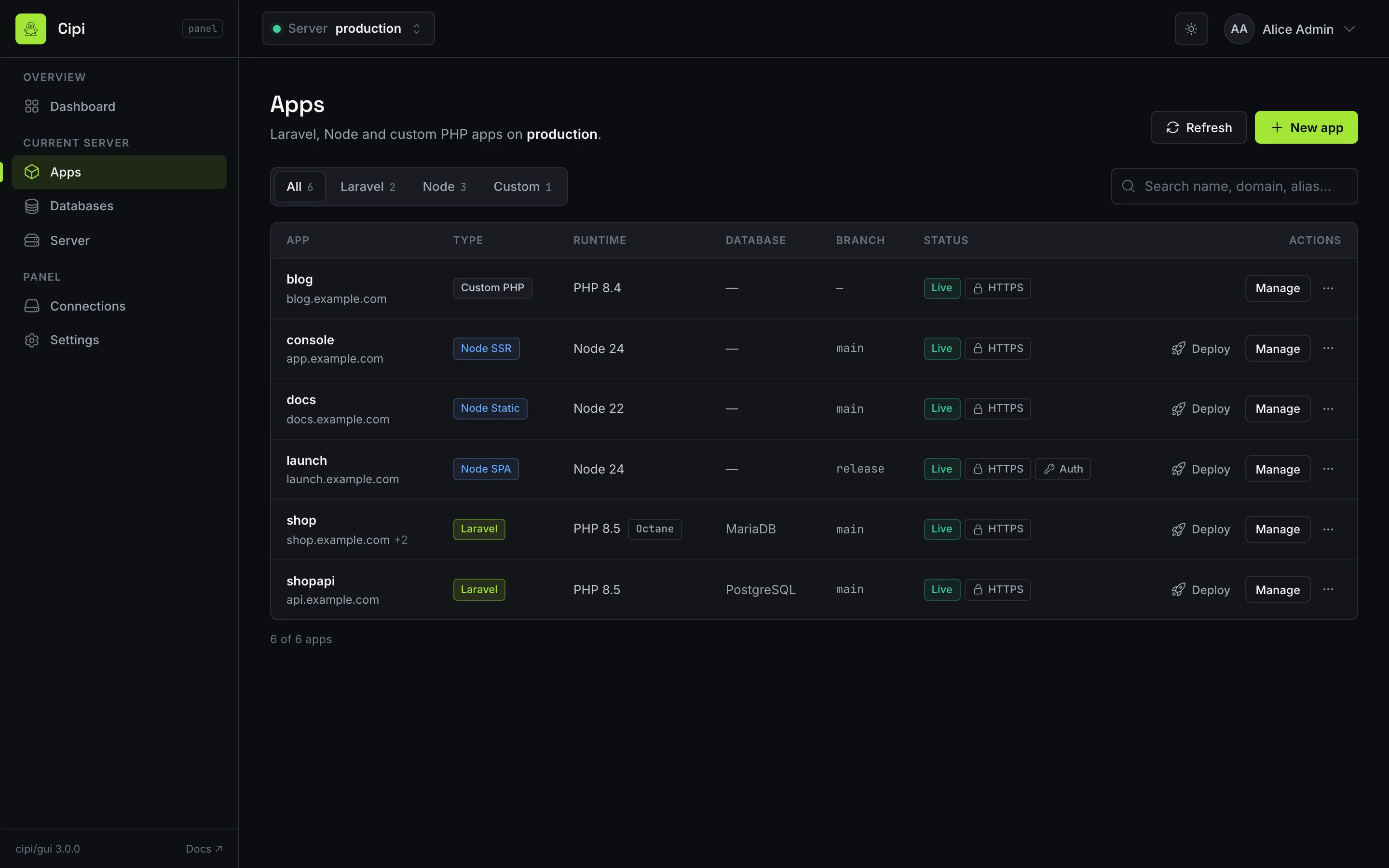
Server cockpit
From API 1.15+ / Cipi 5.0.6+ the panel does not only manage apps: it manages the box.
- Install PHP 8.3, 8.4 or 8.5 (removing a version or switching the default stays on the CLI since API 1.19).
- Add and revoke SSH keys on the
cipiuser. - List and restart system services.
- Configure, test, enable and disable SMTP notifications (the password is never returned on GET).
- Per-app HTTP healthchecks — create, run, remove.
- IP whitelist for the panel API / MCP: one address or CIDR per line, or
*to allow all. - Since API 1.31: Node runtimes, Meilisearch, the optional host packages catalog, the system monitor and Cloudflare Zero Trust — read-only, because installing software or changing a lock is an operator decision taken at the CLI.
- Since API 1.33 / Cipi 5.5.2 / panel 3.1: Server → Disk, the figures of
cipi diskandcipi disk db(abilitydisk-view). The soft limit is shown; setting it is stillcipi app limitson the host (API 1.32).
That is the piece that makes the GUI a real alternative to a SaaS panel, without moving the source of truth off the server.
How to install them
Required order: API on every managed server, then the GUI wherever you want the browser. The GUI can live on the same box or on a small dedicated machine — it is just an HTTP client.
# on every server you will manage
$ cipi api api.example.com
$ cipi api ssl
$ cipi api token create

# on the panel box (can be the same machine)
$ cipi gui panel.example.com
$ cipi gui ssl
cipi gui asks for the first admin email and password (minimum 12 characters, upper, lower, digit, special, no 4 identical characters in a row). Config lands in /etc/cipi/gui.json. PHP-FPM, vhost and scheduler come from the installer: you do not bootstrap Laravel by hand.
Updates: cipi gui update / cipi api update for the daily soft update; upgrade for a full rebuild. cipi gui refresh-theme recompiles the theme only. cipi gui remove uninstalls vhost, pool and scheduler — managed servers stay intact. cipi gui reset-user is the recovery path if an admin loses 2FA.
SSL, 2FA and IP whitelist
The panel starts on HTTP: issue Let's Encrypt immediately with cipi gui ssl (automatic renewal, same ACME as app domains). Login is session-based; each administrator can enable TOTP 2FA (Google Authenticator, 1Password, Aegis) from their profile — opt-in, not mandatory.
Restrict who can talk to the API and MCP:
$ cipi api ip-whitelist add 203.0.113.10
$ cipi api ip-whitelist set --ips=203.0.113.0/24,2001:db8::/32
$ cipi api ip-whitelist show --json
Default file: /etc/cipi/api-ip-whitelist with * (allow all). Rejected clients get 403. REST equivalents live under /api/ip-whitelist; a restricting PUT adds the caller IP automatically unless ensure_client_ip: false.
Use cases: teams, agencies, hosting, AI
- Freelancer with two VPS — API +
cipi-clifrom the laptop, orcipi/sdkinside a Laravel app. The GUI is optional; aprodand astagingprofile are enough. - A team that does not live in SSH — one panel, 2FA, live dashboard, Artisan and logs without handing root to everyone.
- Multi-client agency — one login, N servers. Each box has its own token; dropping a client is revoking a token, not uninstalling Cipi.
- Hosting with billing — the WHMCS module speaks the same REST API: create, SSL, deploy, delete on the product lifecycle.
- AI agents — server MCP for infrastructure; in-app Agent MCP for the codebase. Specs and guardrails in the spec-driven guide.
PHP SDK for Laravel and other frameworks
Until now the official clients of this API were the terminal (cipi-cli), the browser (the GUI), MCP, and WHMCS. cipi/sdk is the PHP client: the same token, the same routes, from a Laravel app or any other PHP process. It does not SSH and it does not run cipi locally. Install it where your code runs:
$ composer require cipi/sdkuse Cipi\Sdk\Cipi;
$cipi = Cipi::connect('https://api.example.com', getenv('CIPI_TOKEN'));
$cipi->apps()->list();
$cipi->wait($cipi->deploys()->start('shop'));On Laravel 11, 12, or 13 the service provider is discovered for you. Set CIPI_BASE_URL and CIPI_TOKEN, then call the Cipi facade or inject Cipi\Sdk\Cipi. Symfony and plain scripts use Cipi::connect() and pass the instance through their own container. HTTPS is required, redirects are not followed, and the token stays out of logs and exception messages. Full method list, job polling, and the error map: PHP SDK.
cipi-cli, the PHP SDK, and WHMCS
The CLI client is a Go binary that talks REST from your laptop: apps, aliases, deploy, SSL, databases, global status, jobs. Same tokens, same multi-server profiles. Prefer the terminal? You do not need the GUI. Prefer PHP? Use cipi/sdk. Prefer the browser? You do not need either. Need all of them on different days? Same API.
$ cipi-cli api token add prod
$ cipi-cli prod apps list
$ cipi-cli prod deploy myapp
$ cipi-cli status
WHMCS is another official client: hosting provisioning with no Composer, drop-in to the modules folder. None of these replaces cipi on the server — they remote it.
Try both extensions on a Cipi VPS
Cipi stays a free, open-source CLI. API and GUI are opt-in packages: install them when you need a browser, a CI webhook or an AI agent — and remove them when you do not.
Frequently asked questions
Do I need the UI panel to use Cipi?
No. Cipi is CLI-first. Without cipi api and without cipi gui the server still does the same work: apps, deploys, SSL, backups, firewall. Both packages are opt-in extensions since v4.7.0.
Can I use the GUI without the API?
No. The panel is an HTTP client of the REST API. Every managed server needs cipi api and a Bearer token with the abilities you want to expose. Without the API there is nothing to show.
Does the GUI replace the CLI on the server?
No. Every browser action is the same cipi command executed via sudo by the panel API. You can keep working over SSH in parallel, with no split-brain state.
What is the difference between REST, MCP, cipi-cli and the PHP SDK?
The same API, several clients. REST is the wire. cipi/sdk is that wire from PHP and Laravel. MCP is for AI agents (Cursor, VS Code, Claude). cipi-cli is the laptop terminal. The GUI is the client built for humans. WHMCS provisions hosting on the same routes.
Can I manage several servers from one panel?
Yes. Register endpoint and token for each box and switch between them with the same login. The panel is stateless relative to your infrastructure: it does not store server state, it reads it from the API.
