When a Laravel app throws an exception in production, you want to know before your users tell you. Boogle is a free, self-hosted exception tracker and uptime monitor for Laravel. This guide installs it as a Cipi app on its own small server, connects your apps, and sets up alerts.
Key ideas, in plain words#
| Term | Meaning |
|---|---|
| Exception | An error your code didn't handle: a 500 page for the user |
| Exception tracker | A service that collects exceptions from your apps, groups them and shows the details |
| Issue | A group of identical exceptions, with a code like #BUG42 |
| Uptime check | A request every minute to see if the site answers; failing means an outage (#OUT) |
| Client package | boogle-client, installed in each app you monitor; it sends exceptions to Boogle |
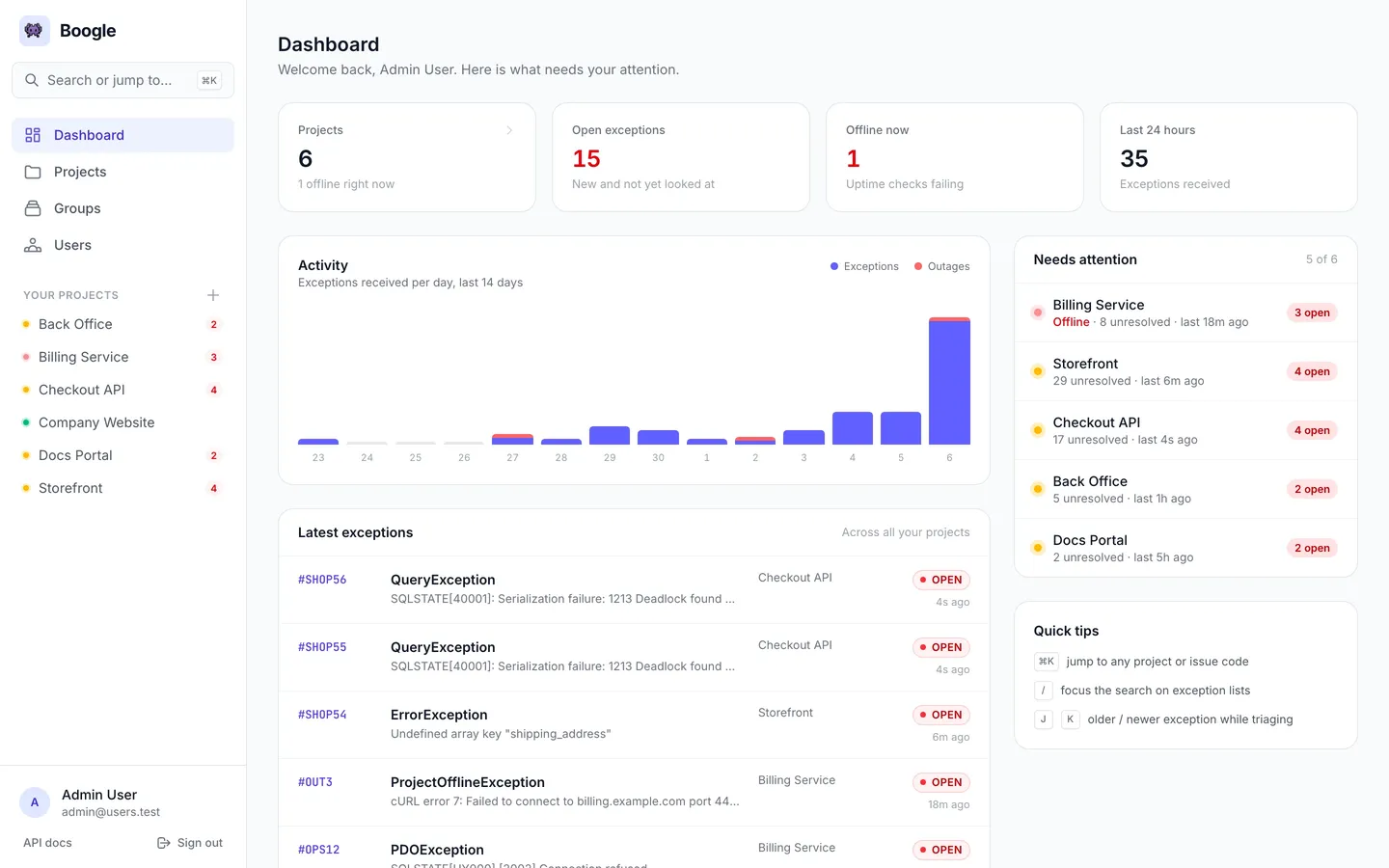
Something breaks in production. Laravel's exception handler catches it as usual.
The client package sends the exception, with the stack trace, request and logged-in user, to your Boogle's /api/log, authenticated with the project's keys.
Boogle stores it and processes it on its queue: identical exceptions become one issue with a code (#BUG42).
You get it in the digest e-mail, open it in the panel, read the trace with your own code highlighted, and mark it Read, Fixed or Done.
Before you start#
- A separate small server for Boogle (1–2 GB RAM is enough), with Cipi installed. A monitor on the same server as the apps can't warn you when that server is down.
- A subdomain such as
boogle.example.compointing at it. - Working e-mail for Boogle (an SMTP service): alerts and digests are e-mails.
- GitHub (or GitLab) account to fork the Boogle repository.
1. Fork Boogle#
Cipi deploys from a Git repository you control, with a read-only deploy key. Open github.com/andreapollastri/boogle and click Fork. Your copy is git@github.com:YOU/boogle.git.
2. Create the app on Cipi#
ssh cipi@MONITOR_IP
sudo cipi app create --user=boogle --domain=boogle.example.com \
    --repository=git@github.com:YOU/boogle.git --branch=main \
    --node-build='npm ci && npm run build'
Add the deploy key from the summary to your fork (Settings → Deploy keys, read-only), then:
sudo cipi git check boogle
sudo cipi deploy boogle
sudo cipi ssl install boogle
What you get for free on Cipi, which Boogle's README asks you to set up by hand:
| Boogle needs | On Cipi |
|---|---|
| A queue worker under Supervisor | Created with the app |
| The scheduler every minute (uptime checks, digests) | Already in the app user's crontab |
| A database | Created, credentials in .env |
| HTTPS | cipi ssl install |
3. Configure it#
sudo cipi app env boogle --set=APP_URL=https://boogle.example.com
sudo cipi app env boogle --set=MAIL_MAILER=smtp
sudo cipi app env boogle      # add MAIL_HOST, MAIL_PORT, MAIL_USERNAME, MAIL_PASSWORD, MAIL_FROM_ADDRESS
sudo cipi app artisan boogle db:seed --force
sudo cipi app artisan boogle config:cache
sudo cipi worker restart boogle
The seeder creates the admin admin@users.test / password. Log in at once and change it (Profile), and turn on two-factor authentication.
4. Create a project#
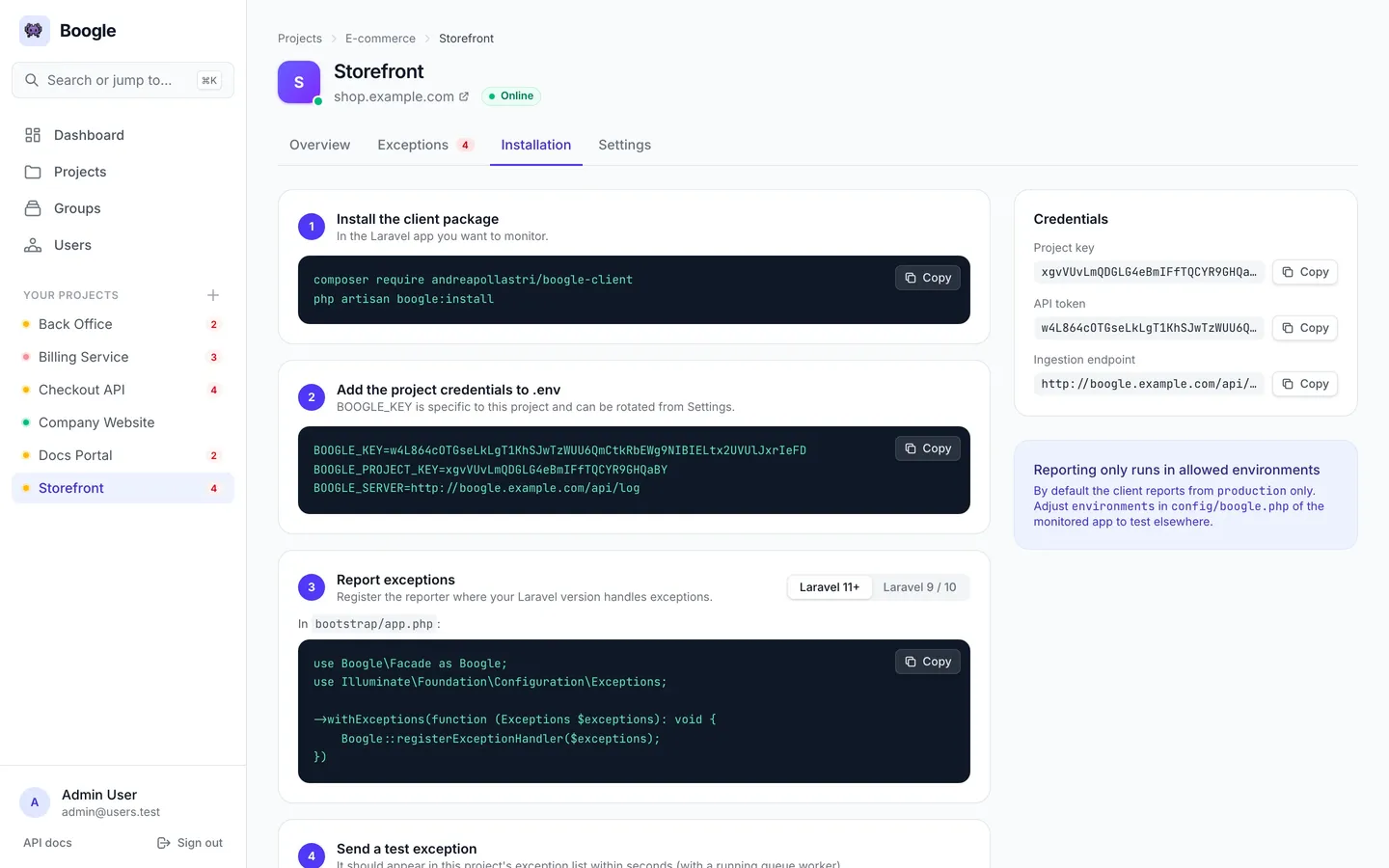
In Boogle, Projects → New: name, URL (https://shop.example.com) and, optionally, a group (its prefix becomes the issue code, e.g. BUG). Open the project's Installation tab: it shows the exact commands and the three keys for that app.
5. Connect your Laravel app#
In the app you want to monitor (on your laptop):
$ composer require andreapollastri/boogle-client
$ php artisan boogle:install
$ php artisan boogle:test
composer require andreapollastri/boogle-client
php artisan boogle:install
Register the reporter. Laravel 11 and newer, in bootstrap/app.php:
use Boogle\Facade as Boogle;
use Illuminate\Foundation\Configuration\Exceptions;

->withExceptions(function (Exceptions $exceptions): void {
    Boogle::registerExceptionHandler($exceptions);
})
(Laravel 9 or 10: call Boogle::handle($e); in a reportable callback in app/Exceptions/Handler.php.)
Commit and deploy. Then put the keys on the server (never in Git):
sudo cipi app env shop --set=BOOGLE_KEY=…
sudo cipi app env shop --set=BOOGLE_PROJECT_KEY=…
sudo cipi app env shop --set=BOOGLE_SERVER=https://boogle.example.com/api/log
sudo cipi app artisan shop config:cache
sudo cipi app artisan shop boogle:test
Within seconds the test exception appears in the project.
The client reports only from the environments listed in config/boogle.php (production by default). On staging, add staging there if you want staging errors too.
6. Turn on uptime checks#
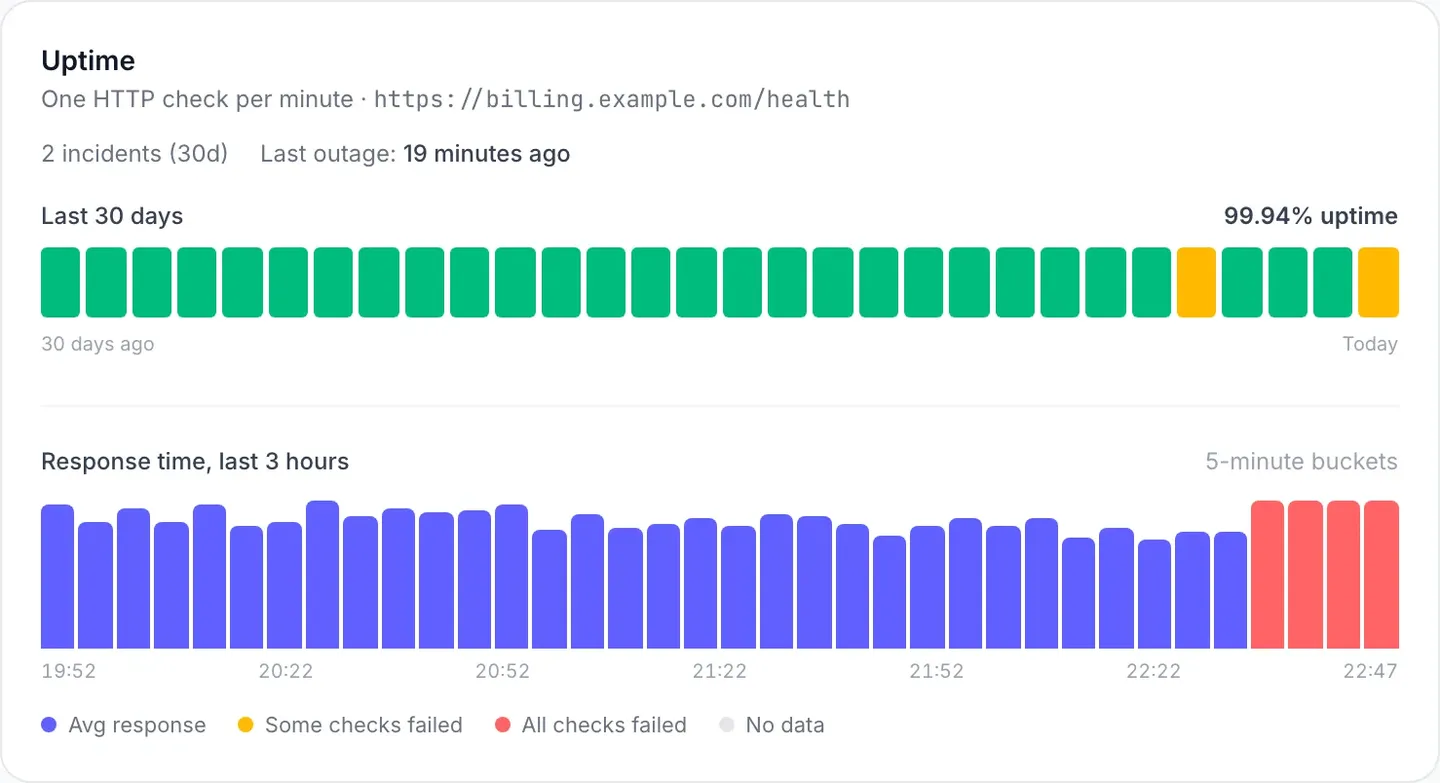
In the project's settings, enable uptime and, if you want a specific page, set the uptime URL (for example the app's /up). Boogle pings it every minute. When it fails, an outage issue (#OUT) opens and you get an e-mail; when it's back, the issue closes and you get a recovery e-mail.
7. Triage like a team#
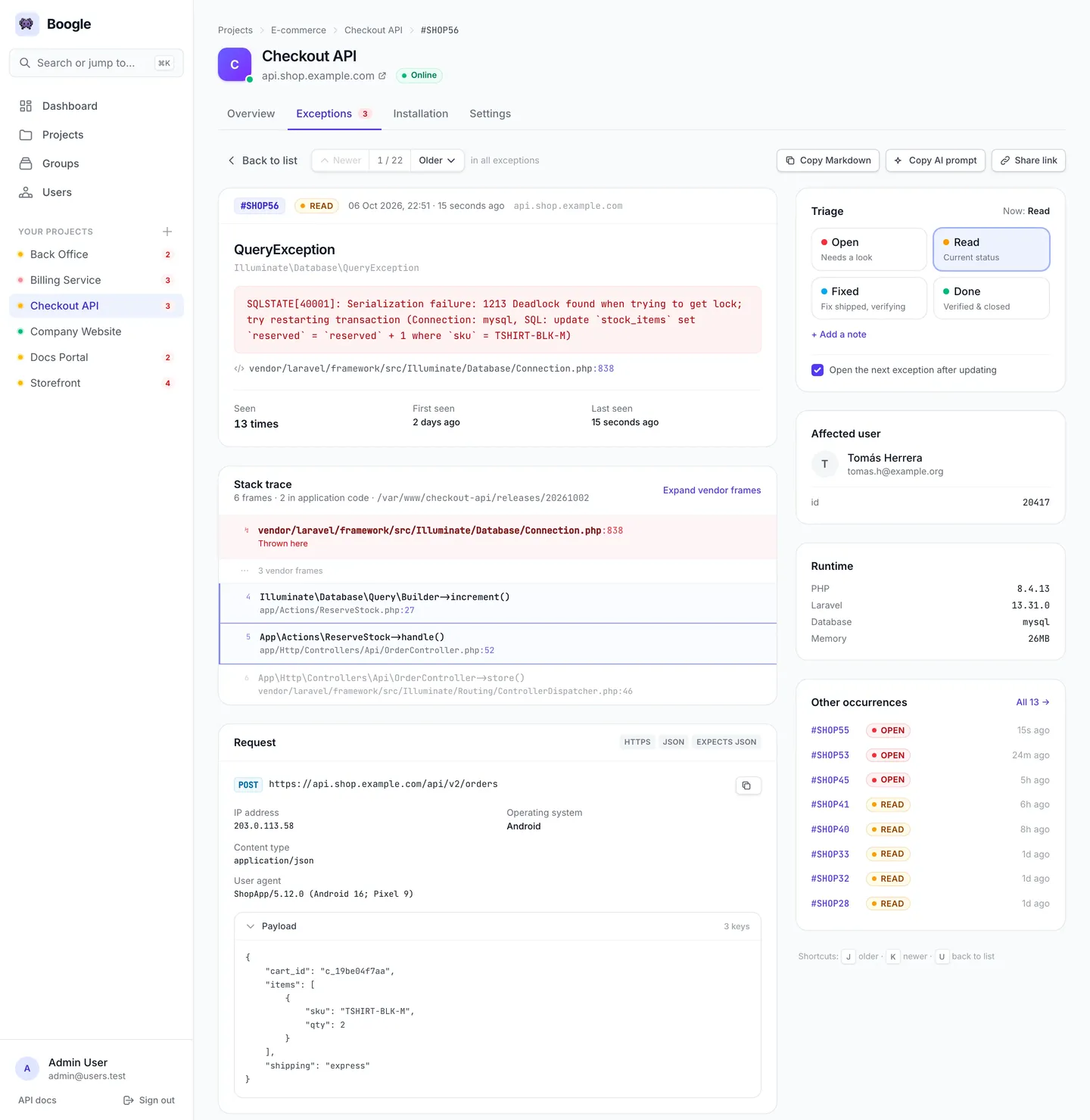
| Status | Use it when |
|---|---|
| Open | New, nobody looked yet |
| Read | Seen, being investigated |
| Fixed | A fix is deployed |
| Done | Closed for good |
Keyboard shortcuts move through the list; bulk actions handle noisy days. Share a read-only link with a client when needed.
How it fits with Cipi's own monitoring#
| Tool | Watches | Alerts on |
|---|---|---|
| Cipi monitor | The server: disk, memory, services, backups, certificates | Server problems |
| Cipi health checks | Each app's health URL, also right after a deploy | Broken releases (with auto-rollback) |
| Boogle | Exceptions inside the code, and uptime from outside | Bugs and outages |
Use all three: they answer different questions. Cipi's alerts go to Telegram, Slack and more (notifications); Boogle's go by e-mail.
Troubleshooting#
| Problem | Fix |
|---|---|
boogle:test fails | Check BOOGLE_SERVER ends with /api/log, the keys match the Installation tab, and run config:cache |
| Test sent but nothing appears | Boogle's queue worker isn't running: sudo cipi worker list boogle |
| No e-mails | MAIL_* wrong in Boogle's .env; e-mails also go through the queue |
| Uptime never checks | The scheduler is off: sudo cipi schedule status boogle |
| Nothing reported from staging | Add staging to environments in config/boogle.php of the monitored app |
| 419 or login loop on the panel | APP_URL doesn't match the domain: fix it and config:cache |
Questions
What is Boogle?
A free, open-source (MIT) Laravel app by Andrea Pollastri that collects exceptions from your Laravel apps and checks that they're online every minute. You host it yourself, so error data never leaves your servers.
Is it a Sentry replacement?
For Laravel apps it covers the core: grouped exceptions with stack traces, request and user context, triage, e-mail digests and uptime. It's Laravel-only and has no performance tracing.
Should Boogle run on the same server as my apps?
Better not: if that server goes down, the monitor goes down with it and can't tell you. Put Boogle on a small separate server (or another provider).
Does it slow my app down?
The client sends the exception in the request that failed and Boogle processes it on its queue. Apps report only from the environments you allow (production by default).
How do I get alerts?
By e-mail: outage and recovery alerts, plus digests of open exceptions. Boogle needs working mail settings and a queue worker, both of which Cipi sets up.
Can I share an issue with a client?
Yes, with a read-only public link that you can turn off, with privacy toggles to hide headers or session data.
How is Boogle updated?
It updates itself from its Settings page, and it understands Cipi's release folders. A normal cipi deploy keeps working too.
What about personal data in exceptions?
Exceptions can include user and request details. Hide headers or session data with the privacy toggles, and remember that exceptions are pruned after 24 months.